Pango Factory: Coding Game
- 3.1
- Rating
- 10.00K
- Installs
- $5.99
- Price
 Analysis by App-foxy
I tested Pango Factory: Coding Game as a short, hands-on learning game for children, and its appeal became clearest when I imagined it on a shared family tablet. One child can sit down for a focused challenge, work through a visual problem, and hand the device to a sibling without turning the experience into a competitive multiplayer session. That makes it a more practical household choice than many educational games that depend on a single child’s long-term profile or a parent’s constant involvement.
This is an educational game from Studio Pango - Kids Fun preschool learning games. Its central idea is simple: children learn early logic, sequencing, and problem-solving by completing playful challenges rather than by reading explanations first. I found that approach much more approachable for children who are not ready for text-heavy coding lessons. The game is listed for Everyone, and it runs on Android devices using version 6.0 or later. It costs $5.99, so the decision is less about trying a free download casually and more about whether this particular style of learning fits your child.
How Pango Factory Works in a Shared Household
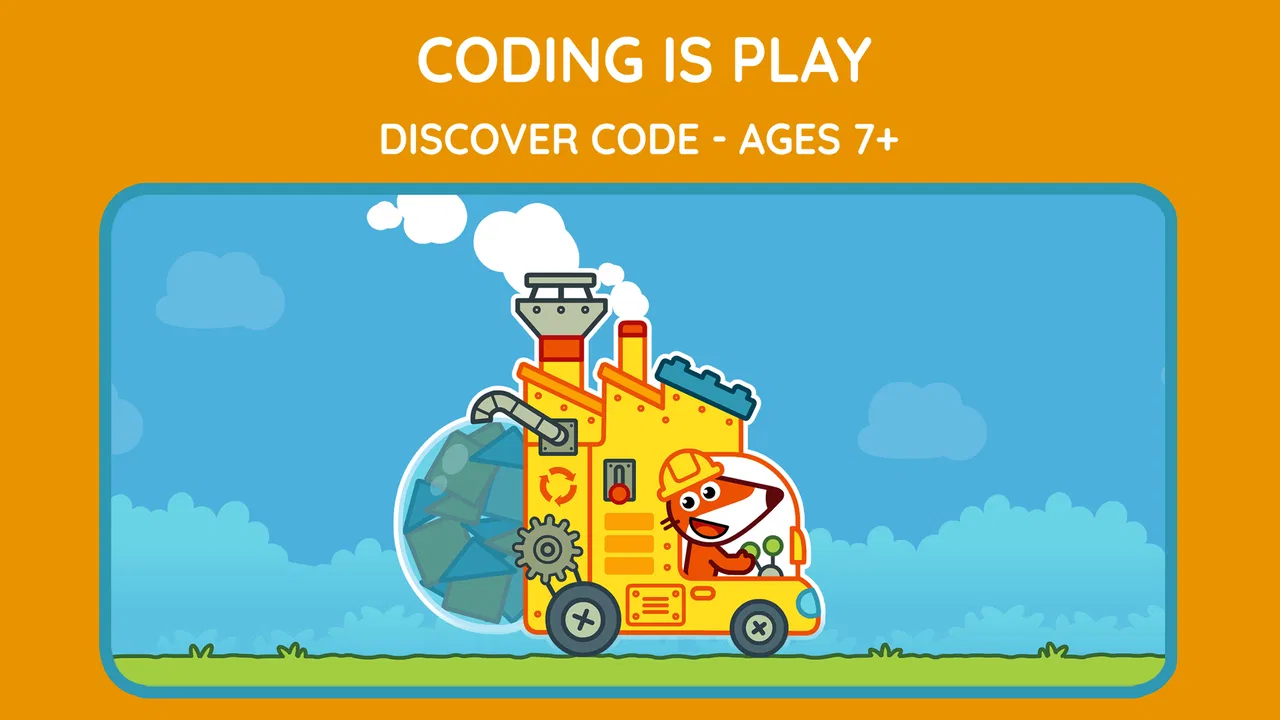
I find that Pango Factory works best in a shared home when the device is treated as a turn-taking activity rather than a personal progress tracker. A simple handoff routine can help siblings stay involved without letting one child take over the problem solving. From there, it is worth looking at how the game’s visual world supports that kind of calm, collaborative play.
You May Also Like

 Blood Strike: 2.5 Anniversary
Blood Strike’s Loadouts Turn Every Drop Into a Tactical Gamble
A close look at Blood Strike’s custom loadouts: how fast access to signature weapons reshapes its battle royale rhythm, rewards preparation, and narrows the gap between fights.

 Pandora - Music & Podcasts
Pandora’s Music Is Easy to Start, but Harder to Recover
Pandora’s strength is its low-effort path from a seed to a station. Its weak spot is how much confidence it asks you to place in connection, setup, and quiet recovery.

 8 Ball Pool
 Is Built on Rivalries, Rematches, and Routine
A close look at the rivalries, rematches, shared routines, and unanswered safety questions that turn a quick pool match into a persistent mobile community.

 Samsung Music
’s Quiet Strength Is Playing What You Already Own
Its reach comes less from spectacle than from dependable access to a personal library. That simplicity is both the app’s strongest retention engine and its ceiling.

 AccuWeather: Weather Radar
AccuWeather Review: A Quick, Clear Forecast for Everyday Decisions
For everyday plans, the best forecast is the one you can understand quickly. AccuWeather makes rain timing, radar, and local conditions easy to act on, with a few trade-offs.

 Hill Climb Racing
Why Hill Climb Racing Still Turns Crashes Into One More Run
A tiny car, a bumpy hill and one more upgrade: Hill Climb Racing keeps resurfacing because its simple chaos makes every near-miss feel personal.
More From Our News Desk
View All News


A useful quiet-time activity, with one important limitation
The most realistic use case is a child using the game during a calm part of the day: while a parent is preparing dinner, during a short car wait, or when a sibling is doing homework nearby. The challenges are suited to brief sessions because the child can concentrate on one problem at a time instead of needing a long story campaign to make progress. I would still stay within earshot for younger children, not because the game is difficult to operate, but because talking through a mistake is where much of the educational value appears.
On a shared device, I would set a simple household routine before handing it over. One child gets a turn, explains what they tried, and then the next child has a chance. This works particularly well because the game’s subject naturally invites discussion: “Which action should come first?” or “What will happen if we change this step?” Those questions turn a solitary screen activity into a small reasoning exercise without requiring a separate worksheet.
The trade-off is that a shared tablet can blur who has completed what. I would not treat the game as a formal curriculum tracker or assume that every child’s progress will be separated automatically. A parent who needs detailed individual records, classroom reporting, or carefully divided learner accounts may prefer a platform designed around those needs. Pango Factory is better understood as an accessible practice space than as a complete school tool.
Why the visual approach suits early learners
The game’s coding theme is presented through playful problem solving rather than typed commands. That matters for preschool-age children and early readers because the barrier is not spelling, keyboard control, or remembering programming syntax. The child can focus on order and consequence: choosing an action, seeing the result, noticing an error, and trying again.
I especially like this kind of introduction for a child who becomes frustrated by conventional educational apps that explain too much before allowing any interaction. Here, the parent can use the child’s attempt as the starting point. If the result is wrong, I would ask the child to predict what needs changing before offering help. That small pause encourages reasoning instead of turning the adult into a button-finder.
There is also a useful distinction between entertainment and learning here. The playful presentation can make the activity feel like a game, but the parent should not expect the child to absorb programming concepts simply by watching. The strongest results come when the child actively rearranges or evaluates steps and then talks about why the solution works. For independent screen time, it remains a reasonable choice; for meaningful learning, a little conversation makes it stronger.
Setting boundaries before the first session
Because the game is paid, I would make the installation decision with the household in mind rather than allowing every child to request it separately. On a family device, it is worth agreeing on who may use the app, when it is available, and whether the device is for learning time only. Those boundaries are not supplied by the game itself; they are simple household rules that prevent arguments later.
I would also check the device’s operating system before buying. The minimum requirement is Android 6.0, which covers many older devices but not every phone or tablet still in circulation. If your child uses a hand-me-down device, checking compatibility first avoids paying for something that cannot be installed comfortably. A larger screen is also preferable for young children, since visual sequencing tasks are easier when the child can see the whole challenge without crowding.
The price of $5.99 changes how I judge the experience. I would not buy it expecting an endlessly expanding subscription service or a broad collection of unrelated subjects. I would buy it when I specifically wanted a focused, child-friendly introduction to logic and sequencing. That makes the purchase easier to justify for a family that values reusable learning activities, but less attractive if the child quickly loses interest in puzzle-based tasks.
Coordinating help without taking over
The most effective adult role is not to solve the challenge. I found that children benefit more when the parent asks them to describe the intended order aloud. A useful routine is to have the child point to the first action, predict the outcome, and only then start. If the result is unexpected, ask which step caused the problem. This turns a mistake into a small debugging lesson without introducing technical vocabulary that may be too abstract.
With siblings, I would avoid letting the older child become the permanent instructor. An older child may understand the sequence quickly and start moving pieces for the younger one, which makes the session look successful while removing the younger child’s reasoning practice. A better arrangement is for the older child to ask questions and let the younger child operate the game. That preserves cooperation while keeping the learning task with the intended player.
A second practical tip is to stop at a natural point instead of using the game until the child becomes tired. Early logic activities can feel easy at first and suddenly become frustrating when attention fades. Ending after a successful attempt gives the child a clear sense of completion. If the child is repeatedly guessing rather than thinking, I would pause and return later instead of turning the app into a battle over correct answers.
What parents should expect from the learning value
The game is a good fit for practicing the foundations behind coding: order, cause and effect, and planning before acting. It is not a replacement for teaching a child to read code, build a project, or understand a full programming language. That is not a flaw, but it is important to buy it for the right reason. The value is in making abstract logic concrete and approachable.
I would recommend it to a child who enjoys arranging things, solving “what comes next” problems, or repeating a challenge to improve an answer. I would be more cautious with a child who mainly wants fast action, character collecting, or open-ended creative tools. The coding label may attract children who imagine a building game, while the actual experience is centered on guided problem solving. Explaining that difference helps avoid disappointment.
It can also complement ordinary play. After a session, a parent could ask the child to give instructions for a simple real-world task, such as putting toys away in a certain order. The point is not to pretend that household chores are programming, but to help the child notice that instructions need sequence and clarity. That is one of the more useful ways to carry the game’s reasoning beyond the screen.
Age, trust, and the role of adult supervision
The Everyone content rating makes the game suitable for a broad audience, but age labels do not tell me whether every child will find the challenges equally comfortable. A younger preschooler may need an adult to interpret the task or keep attention on the sequence. An older child may move through the early ideas quickly and want more complexity. I would judge readiness by the child’s ability to follow a short instruction, notice a result, and try a different approach.
For families sharing one device, trust is mostly about clear expectations rather than hidden technical controls. I would show children how to open the game, how to leave it, and when to hand the device back. I would not assume that the game itself will manage sibling turns, protect one child’s progress from another, or enforce screen-time limits. Those are household responsibilities, so the app works best when the adult sets the boundaries around it.
The developer is Studio Pango - Kids Fun preschool learning games, which gives the product a clear preschool-learning identity. That focus helped me understand what the game is trying to do: offer a friendly first step into structured thinking, not compete with advanced coding platforms. The app has been available since Jun 12, 2019, and its current version is 1.5.0. Those details are useful when considering an older device or deciding whether the experience matches a family looking for something current and frequently changing.
How it compares with familiar alternatives
Compared with a traditional worksheet, Pango Factory has the advantage of immediate interaction. A child can test an idea and see whether the sequence works, rather than waiting for an adult to mark an answer. That makes it more inviting for children who resist paper exercises. The worksheet still wins when a parent wants to see every step on one page or continue the activity away from a screen.
Compared with general puzzle games, this one has a clearer educational purpose. A typical puzzle app may reward speed, matching, or visual recognition, while this experience is more directly connected to planning and ordered instructions. On the other hand, a general puzzle game may offer greater variety or a stronger sense of challenge for older children. I would choose Pango Factory when the learning goal is early logic, not simply keeping a child occupied.
Compared with block-based coding tools, it is easier to approach but less ambitious. Block coding platforms can eventually lead to stories, animations, and projects that belong to the child. Pango Factory is more controlled, which helps a beginner focus on one reasoning task but gives less room for personal creation. For a first introduction, that simplicity is a strength. For a child already building sequences independently, a more open coding environment may be the better next step.
Where the experience may fall short
The average rating is 3.1 from around 80 ratings, while the app has received about 6 written reviews. I would treat that as a reason to keep expectations measured rather than as an automatic rejection. A small review sample cannot explain exactly why people felt differently, but it does suggest that the experience will not be a universal hit. The focused design that helps one child learn may feel repetitive or limited to another.
The paid price also raises the standard. If the child plays once and moves on, the purchase will feel less worthwhile than it would for a child who returns to practice. I would watch the first session closely and ask whether the child is making choices or merely tapping through. That observation tells you more about fit than the educational label alone.
Another limitation is the lack of a natural household coordination layer. Families who need separate child profiles, progress reports, or formal supervision tools should look toward an educational platform built for account management. I would also choose another option for children who want creative coding, multiplayer competition, or a broad range of subjects. Pango Factory’s strength is its narrow focus, and that same focus limits its role.
My household verdict
After considering how it works on a shared device, I see Pango Factory as a sensible purchase for families seeking a gentle introduction to logic and sequencing. It is especially suitable when an adult can occasionally ask questions, encourage prediction, and let the child correct mistakes independently. The game can support a short quiet-time routine without pretending to replace a teacher or a complete coding course.
I would skip it if your main goal is advanced programming, detailed learner tracking, unrestricted creative projects, or a large entertainment library for one payment. I would also hesitate if the child strongly prefers fast action and loses patience with ordered problem solving. In those cases, a block-coding tool, a broader puzzle collection, or a non-screen activity may provide a better match.
For the right child, however, the modest scope is useful. The game gives parents a concrete way to talk about instructions, mistakes, and consequences without making the subject intimidating. My recommendation is to treat it as a shared learning activity rather than a digital babysitter: establish turns, keep sessions purposeful, and let the child explain the solution. With those expectations, Pango Factory: Coding Game earns its place as a focused educational game for early logic practice, even though its limited scope and mixed reception mean it is best chosen thoughtfully rather than automatically.
Overall, I would recommend it to a household that wants one approachable starting point for coding ideas and is comfortable providing the structure around the app. It is a small, specific tool, not an all-purpose learning system. That honesty is also its appeal: when a child needs a friendly way to begin thinking in sequences, it can make the first step feel like play.
FAQs for Pango Factory: Coding Game
01What is Pango Factory: Coding Game?
Pango Factory: Coding Game is an educational puzzle game designed to introduce young children to basic programming concepts through playful factory challenges. Players help Pango organize actions, solve production tasks, and guide characters by arranging instructions in the correct order. The experience focuses on logic, sequencing, problem-solving, and experimentation rather than reading-heavy explanations or traditional competitive gameplay.
02Is Pango Factory: Coding Game suitable for young children?
The game is primarily aimed at preschool and early elementary-age children, especially those who are beginning to develop logical thinking skills. Its visual interface, simple objectives, and friendly characters make it approachable for children who may not yet understand formal coding terminology. Parents should still consider their child’s attention span, motor skills, and familiarity with tablet controls before downloading it.
03Does the game teach real programming or coding skills?
Pango Factory: Coding Game does not teach children to write programming languages such as Python, JavaScript, or Scratch code. Instead, it introduces foundational ideas used in programming, including step-by-step instructions, sequencing, planning, cause and effect, and correcting mistakes. These concepts are presented through interactive puzzles, making the game a gentle first introduction to computational thinking.
04Does Pango Factory: Coding Game require an internet connection?
The game is generally designed as a self-contained mobile experience, so many activities can be played without a continuous internet connection after installation. However, internet access may be needed for downloading the app, receiving updates, restoring purchases, or checking platform-related services. Parents should also review the store listing for the current offline-play details, since requirements can change between versions.
05Are there advertisements or in-app purchases in Pango Factory: Coding Game?
The availability of advertisements, paid content, or premium features can depend on the version and the store listing for Android or iOS. Before installing, parents should check the app’s purchase information and privacy details carefully. If the game is intended for a child, it is also sensible to enable device-level parental controls and require approval for purchases to prevent accidental transactions.
Pros
- Introduces coding logic through playful
- age-appropriate challenges.
- Simple controls make it accessible for young children.
- Bright visuals and animations help maintain attention.
- Progressive puzzles encourage problem-solving and experimentation.
- Works well as a screen-time activity with educational value.
Cons
- Some children may complete the available puzzles fairly quickly.
- Limited appeal for older kids seeking advanced programming concepts.
- Requires patience when repeating tasks to find the correct solution.
- Educational content focuses mainly on basic sequencing and logic.
- Parents may need to explain coding ideas during the first sessions.

Pango Factory: Coding Game
Gallery